
Spice Frames#
This notebook walks the user through the process of creating Spice Frames. The Karana.Frame.SpiceFrame is a special type of Karana.Frame.Frame that is associated with planetary bodies for ephemerides.
Requirements:
In this tutorial we will:
Create SpiceFrames for planetary bodies
Create SpiceFrameToFrames to tie together ephemerides
Setup the kdFlex scene
Attach ProxySceneNodes to each planet
Query ephemeris data for bodies
Run and Clean up the Simulation
For a more in-depth descriptions of kdflex concepts see usage.
import os
import atexit
from typing import cast
from time import sleep

import Karana.Core as kc
import Karana.Math as km
import Karana.Integrators as ki
import Karana.Frame as kf
import Karana.Dynamics as kd
import Karana.Dynamics.SOADyn_types as kdt
import Karana.Scene as ks
import Karana.KUtils as ku
import Karana.Models as kmdl
from Karana.KUtils.Sim import Sim
Create SpiceFrames for Planetary Bodies#
In order to use Spice Frames we need to make sure that we’ve loaded the proper NaifKernels. Below we make sure that the path to load these Kernels is correct. These kernels provide the Spice data for inner solar system bodies excluding Mars. To load other planetary bodies you will have to use different Naif kernels
Datasets with Mars are significantly larger in size and take longer to load… hence Mars’ exclusion from this notebook
yam_install = os.getenv("YAM_INSTALL")
if yam_install is not None:
    kpath = yam_install + "/share/Karana/spice_kernels/"
else:
    kpath = "/usr/share/Karana/spice_kernels/"

kf.SpiceFrame.loadNaifKernel(kpath + "naif0012.tls")
kf.SpiceFrame.loadNaifKernel(kpath + "pck00011.tpc")
kf.SpiceFrame.loadNaifKernel(kpath + "de442s.bsp")
We now initialize a Karana.KUtils.Sim.Sim and create Karana.Frame.SpiceFrame’s for bodies in the inner Solar System.
# initialization
sim = Sim()

# create Spice Frames for celestial bodies
mercury = kf.SpiceFrame(sim.fc, 199)
venus = kf.SpiceFrame(sim.fc, 299)
earth = kf.SpiceFrame(sim.fc, 399)

# load solar system barycenter
ssbc_j2000 = kf.SpiceFrame(sim.fc, 0, 1)

# load the sun and moon
sun_j2000 = kf.SpiceFrame(sim.fc, 10, 1)
moon = kf.SpiceFrame(sim.fc, 301)
Create SpiceFrameToFrames To Tie Together Ephemerides#
We also create Karana.Frame.SpiceFrame2Frame’s to connect the frames to one another. This is necessary in order tie all the ephemeris data together and query/visualize the planetary bodies’ orbits.
# Create some Spice frame to frame edges. These can be from the barycenter to
# a planetary body, or from planetary body to planetary body. It's necessary
# for us to tie all these together so we can obtain relative ephemeris data
# and then visualize it.
kf.SpiceFrameToFrame(ssbc_j2000, sun_j2000)
kf.SpiceFrameToFrame(ssbc_j2000, earth)
kf.SpiceFrameToFrame(ssbc_j2000, mercury)
kf.SpiceFrameToFrame(ssbc_j2000, venus)
kf.SpiceFrameToFrame(earth, moon)

kf.PrescribedFrameToFrame(sim.fc.root(), ssbc_j2000)

# ensure the frame container is healthy and show the frame tree
sim.fc.ensureHealthy()
sim.fc.root().dumpFrameTree()
Next we set the epoch to query our Spice Frames with
# Change the integrator to NO_OP, since we don't have any dynamics.
# It will just keep track of time and propagate forward
sim.sp.setIntegrator(ki.IntegratorType.NO_OP)
sim.sp.setTime(0.0)
sim.sp.setState(sim.sp.assembleState())

# set the epoch
sim.sp.getTimeKeeper().setInitialEphemeris(kd.TimeKeeper.utcTimeToEphemeris("2025-12-25T00:00:00"))
Setup the kdFlex Scene#
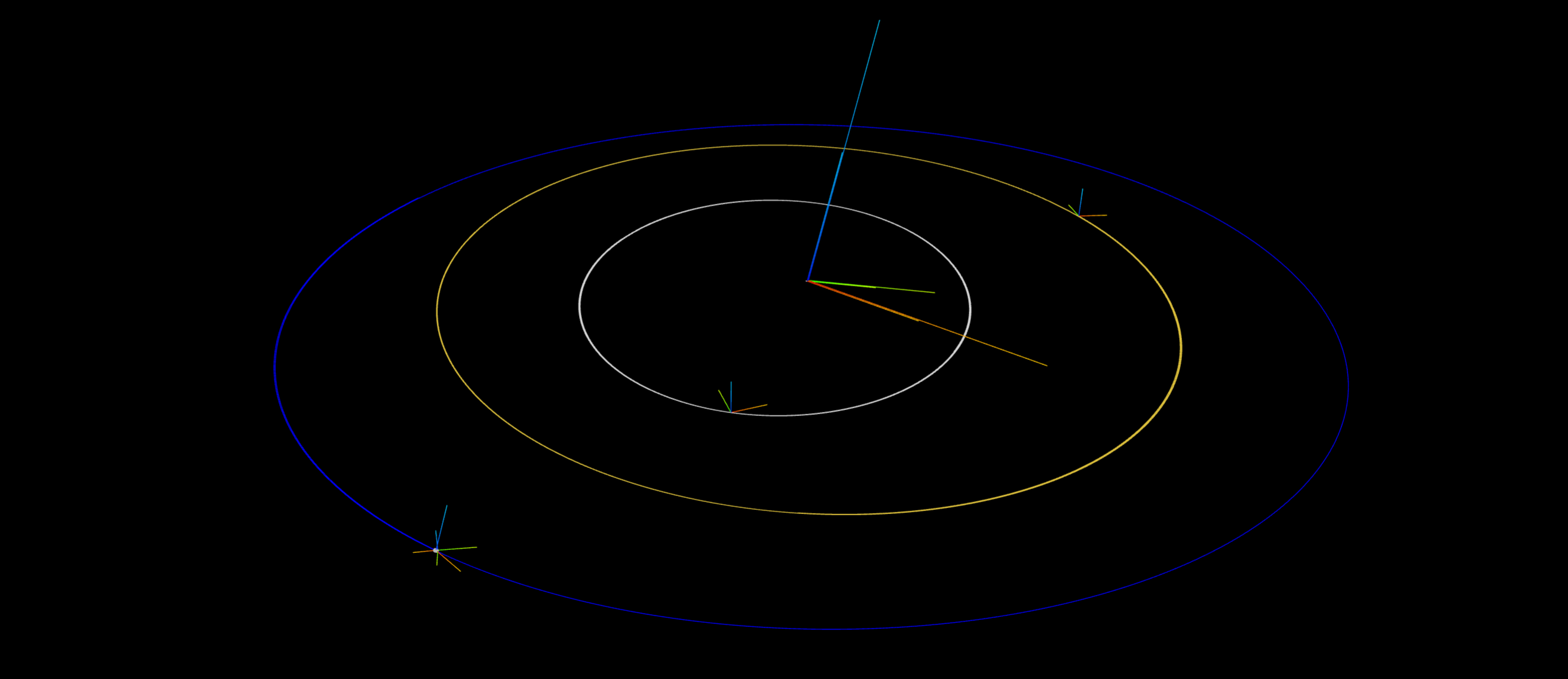
Set up the graphics scene and visualize the Spice Frames.
# This helper method sets up the graphics
_, web_scene = sim.setupGraphics(port=0)
web_scene._setBackgroundColor(ks.Color.BLACK)

# get the location of the Earth and set the web scene camera facing it
earth_loc = sim.fc.root().frameToFrame(earth).relTransform().getTranslation()
web_scene.defaultCamera().pointCameraAt([0.0, 0.0, 1e11], earth_loc, [0, 0, 1])
projection = ks.PerspectiveProjection()
projection.near = 1e8
projection.far = 1e14
web_scene.defaultCamera().setProjection(projection)
del web_scene

# get our proxy scene
proxy_scene = sim.mb.getScene()
Attach ProxySceneNodes to Each Planet#
Below we add ProxySceneNodes for each planetary body we are interested in tracking.
earth_node = ks.ProxySceneNode("earth_scene_node", proxy_scene)
earth_node.attachTo(earth)
earth_node.graphics().showAxes(1e10)
earth_node.graphics().trail(color=ks.Color.BLUE)

ssbc_node = ks.ProxySceneNode("ssbc_scene_node", proxy_scene)
ssbc_node.attachTo(ssbc_j2000)
ssbc_node.graphics().showAxes(8e10)
ssbc_node.graphics().trail()
del ssbc_node

sun_node = ks.ProxySceneNode("sun_scene_node", proxy_scene)
sun_node.attachTo(sun_j2000)
sun_node.graphics().showAxes(4e10)
sun_node.graphics().trail()
del sun_node

mercury_node = ks.ProxySceneNode("mercury_scene_node", proxy_scene)
mercury_node.attachTo(mercury)
mercury_node.graphics().showAxes(1e10)
mercury_node.graphics().trail(color=ks.Color.DARKGRAY)
del mercury_node

venus_node = ks.ProxySceneNode("venus_scene_node", proxy_scene)
venus_node.attachTo(venus)
venus_node.graphics().showAxes(1e10)
venus_node.graphics().trail(color=ks.Color.DARKGOLDENROD)
del venus_node

moon_node = ks.ProxySceneNode("moon_scene_node", proxy_scene)
moon_node.attachTo(moon)
moon_node.graphics().showAxes(5e9)
moon_node.graphics().trail(earth_node.graphics(), color=ks.Color.GREY)
del moon_node
del earth_node

proxy_scene.update()
Run and Clean Up the Simulation#
Below we run our simulation. As the StatePropagator advances, it will update the ephemeris and the SpiceFrames locations. Adding the graphics above already adds a model to update the ProxyScene. However, we want a KModel to add artificial sleeps in so we can see what is happening. Otherwise, the simulation will proceed so quickly we won’t be able to see anything except the last frame. Hence, we add a SyncRealTime KModel to run this at a fraction of real time, we aim for 1 hour of simulation time every 0.01 seconds.
# Add a model to run things in a fraction of real-time
kmdl.SyncRealTime("sync_time", sim.sp, 3600 / 0.01)

# Run for 2 years in increments of one hour
for _ in range(24 * 365 * 2):
    sim.sp.advanceBy(3600)
Below, we cleanup everything whenever the script exists. This requires us to delete local variables and discard our containers and scene.
# Cleanup
def cleanup():
    """Cleanup the simulation."""
    global mercury, earth, venus, moon, sun_j2000, ssbc_j2000, proxy_scene, sim
    del mercury, moon, venus, earth, sun_j2000, ssbc_j2000, proxy_scene, sim


atexit.register(cleanup)