
Flexible Two-Link Pendulum from FEMBridge H5 File#
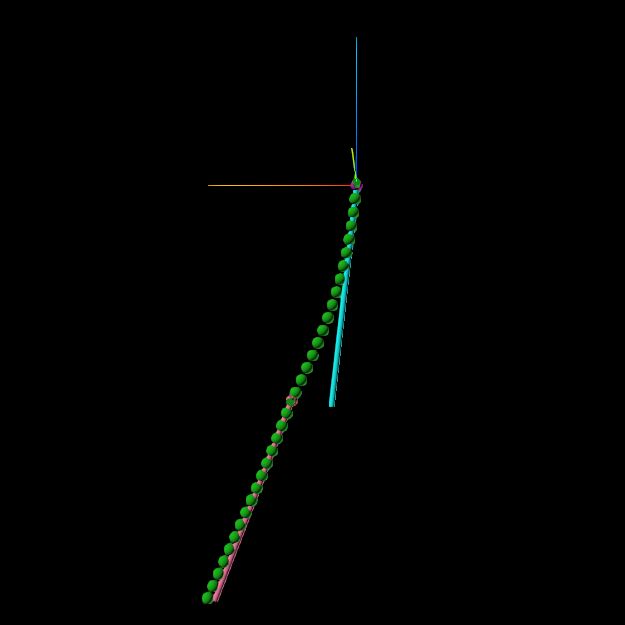
This notebook walks you through creating a simple two-link pendulum, where both links in the pendulum are flexible bodies.
Complete the basic two-link pendulum before working through this example. We use the same simulation setup, but replace both rigid links with flexible beams imported from a FEMBridge H5 file.
import atexit
from pathlib import Path

import numpy as np
import Karana.Dynamics as kd
import Karana.Dynamics.SOAFlexDyn_types as kdft
import Karana.Integrators as ki
import Karana.Models as kmdl
from Karana.KUtils.Sim import Sim
from Karana.Math.Kquantities import ureg

beam_file = Path("..") / "resources" / "2_link_pendulum" / "flexible_beam.h5"
Create the Simulation#
As in the basic example, use Karana.KUtils.Sim.Sim to manage the multibody, state propagator, and frame container.
sim: Sim = Sim()
Read the FEMBridge Beam#
Karana.Dynamics.SOAFlexDyn_types.ReadFEMBridgePhysicalModalBody imports flexible-body data from a FEMBridge H5 file. The original FEM analysis supplies the beam’s mass properties, modal frequencies, and mode shapes. We reuse this model for both links.
The beam used in this simulation is extremely flexible. This is to help make the deformation easily visible.
The Karana.Dynamics.SOAFlexDyn_types.FEMBridgePhysicalModalBodyDS configuration specifies the file’s mass and length units, pnode grid point, damping, and sensor nodes. p_node_grid=1 selects FEM grid node 1 for the pnode; this is the node on link_1 used for the hinge that attaches it to its parent body. The imported definition places this joint node at location of grid point 1 in the original FEM file and uses the corresponding translational and rotational nodal matrices, which gives the joint the coupling needed to produce the correct flexible dynamics.
damping=0.05 specifies a 5% modal damping ratio. The sensor-node mapping creates nodes along the beam that can be used to visualize its flexible deformation.
beam_reader = kdft.ReadFEMBridgePhysicalModalBody(
    kdft.FEMBridgePhysicalModalBodyDS(
        filename=beam_file,
        mass_unit=ureg.kg,
        length_unit=ureg.m,
        p_node_grid=1,
        damping=0.05,
        sensor_nodes={node: f"sn_{node}" for node in range(1, 52, 3)},
    )
)
Create the First Link#
Create a revolute hinge about y-axis, as in the basic example. getModalBodyDS() combines the PhysicalHingeParams with the imported beam model to create a ModalBodyDS: this now contains a complete flexible-body definition, including all the information need to connect it to its parent body. The toBody() method creates the actual flexible-body and attaches it to its parent (the virtual root in this case).
link_1_ds = beam_reader.getModalBodyDS(
    "link_1",
    kd.PhysicalHingeParams(
        hinge_type=kd.HingeType.REVOLUTE,
        subhinge_params=[kd.PinSubhingeParams(unit_axis=np.array([0.0, 1.0, 0.0]))],
    ),
)
link_1: kd.PhysicalModalBody = link_1_ds.toBody(sim.mb.virtualRoot())
Attach the Second Link#
Deep-copy the first link’s definition to reuse its data. Here, we change the name, and modify the coupling to the parent body, since the second link is connected to the first link, which itself is a flexible body. Whenever one is attaching a body of any type (rigid or flex) to a a flexible body, meaning the flexible body is the parent, they need to specify the translational and rotational nodal matrix of the onode. The onode is the node on the parent body in a hinge that connects a parent body to a child body. In this case, the hinge will connect that pnode on link_2 to an onode on link_1 at the beam’s far end, FEM grid node 51.
In general, the ParentPhysicalModalBodyAttachmentParams can be used to specify the onode attachment information for a flexible body. Here, addInbNodeToDS() provides a convenient helper method to add this information.
link_2_ds = link_1_ds.model_copy(deep=True)
link_2_ds.name = "link_2"
beam_reader.addInbNodeToDS(link_2_ds, 51)
link_2 = link_2_ds.toBody(link_1)
del link_1_ds, link_2_ds
Add Gravity#
Add gravity just as was done in the basic example.
ug = kmdl.Gravity("grav_model", sim.sp, kmdl.UniformGravity("uniform_gravity"), sim.mb)
ug.getGravityInterface().setGravity(np.array([0, 0, -9.81]), 0.0, kmdl.OutputUpdateType.PRE_HOP)
del ug
Set the Initial State#
Initialize the multibody as in the basic example, then set the hinge angles to 110° and 15°. Both links start at rest with zero modal coordinates, so the release produces swinging motion and flexible-body deformation.
sim.mb.ensureHealthy()
sim.mb.resetData()
link_1.parentHinge().subhinge(0).setQ(110.0 * ureg.deg)
link_2.parentHinge().subhinge(0).setQ(15.0 * ureg.deg)
True
Configure the Integrator#
Here, we configure the integrator. The performance of flexible-body problems in particular is sensitive to the integrator chosen. kdFlex offers a large variety of integrators and options to meet simulations’ needs. Here, SUNDIALS’s ARKODE’s implicit ESDIRK45 method does well.
integrator_options = ki.ArkImplicitIntegratorOptions()
integrator_options.rtol = 1e-5
integrator_options.atol = 3e-8
integrator_options.max_nl_iters = 5
sim.sp.setIntegrator(ki.IntegratorType.ARKIMPLICIT_ESDIRK45, integrator_options)

sim.sp.ensureHealthy()
sim.sp.hardReset()
sim.sp.setState(sim.sp.assembleState())

# Here, a maximum hop size is added so we get visualization updates every 1/60 seconds
sim.sp.setMaxHopSize(1.0 / 60.0)
Open the kdFlex Viewer#
Open up the GUI to view the model, and set the camera position.
# Set the stick parts to be a bit larger so they are easier to see
sim.mb.createStickParts()
sim.mb.scaleStickParts(5.0)

# Create the GUI and set the camera location
sim.setupGui(port=0)
target = sim.mb.virtualRoot().frameToFrame(link_2).relTransform().getTranslation().m
sim.mb.getScene().viewAroundFrame(
    sim.mb.virtualRoot(),
    target + np.array([0.0, 6.0, 0.0]),
    target,
    np.array([0.0, 0.0, 1.0]),
)
[WebUI] Karana Viewer is running on port 32891
Open this URL to connect:
	http://newton:32891
Run the Simulation#
Advance to 10 seconds.
sim.sp.advanceTo(10.0)
<SpStatusEnum.REACHED_END_TIME: 1>
Clean Up the Simulation#
Below, we cleanup our simulation.
def cleanup() -> None:
    """Cleanup the simulation."""
    global link_1, link_2, sim
    del link_1, link_2, sim


atexit.register(cleanup)
<function __main__.cleanup() -> None>
Further Reading#
Next, work through the Flexible Two-Link Pendulum from Explicit Modal Data notebook. It builds the same pendulum using explicit modal data, without an external file, so you can see how to supply the flexible-body parameters directly.