
Spice Frames#
This notebook walks the user through the process of creating Spice Frames. The Karana.Frame.SpiceFrame is a special type of Karana.Frame.Frame that is associated with planetary bodies for ephemerides.
Requirements:
In this tutorial we will:
Create SpiceFrames for planetary bodies
Create SpiceFrameToFrames to tie together ephemerides
Setup the kdFlex scene
Attach ProxySceneNodes to each planet
Query ephemeris data for bodies
Run and Clean up the Simulation
For a more in-depth descriptions of kdflex concepts see usage.
import os
import atexit
from typing import cast
from time import sleep
from Karana.Frame import (
    FrameContainer,
    PrescribedFrameToFrame,
    SpiceFrame,
    SpiceFrameToFrame,
)
from Karana.Dynamics import Multibody, PhysicalBody, TimeKeeper
from Karana.Scene import Color, PerspectiveProjection
from Karana.Scene import ProxySceneNode
from Karana.Core import discard
Create SpiceFrames for Planetary Bodies#
In order to use Spice Frames we need to make sure that we’ve loaded the proper NaifKernels. Below we make sure that the path to load these Kernels is correct. These kernels provide the Spice data for inner solar system bodies excluding Mars. To load other planetary bodies you will have to use different Naif kernels
Datasets with Mars are significantly larger in size and take longer to load… hence Mars’ exclusion from this notebook
yam_install = os.getenv("YAM_INSTALL")
if yam_install is not None:
    kpath = yam_install + "/share/Karana/spice_kernels/"
else:
    kpath = "/usr/share/Karana/spice_kernels/"

SpiceFrame.loadNaifKernel(kpath + "naif0012.tls")
SpiceFrame.loadNaifKernel(kpath + "pck00011.tpc")
SpiceFrame.loadNaifKernel(kpath + "de442s.bsp")
We now initialize a Karana.Frame.FrameContainer and create Karana.Frame.SpiceFrame’s for bodies in the inner Solar System.
# initialization
fc = FrameContainer("fc")

# create Spice Frames for celestial bodies
mercury = SpiceFrame(fc, 199)
venus = SpiceFrame(fc, 299)
earth = SpiceFrame(fc, 399)

# load solar system barycenter
ssbc_j2000 = SpiceFrame(fc, 0, 1)

# load the sun and moon
sun_j2000 = SpiceFrame(fc, 10, 1)
moon = SpiceFrame(fc, 301)
Create SpiceFrameToFrames To Tie Together Ephemerides#
We also create Karana.Frame.SpiceFrame2Frame’s to connect the frames to one another. This is necessary in order tie all the ephemeris data together and query/visualize the planetary bodies’ orbits.
# Create some Spice frame to frame edges. These can be from the barycenter to
# a planetary body, or from planetary body to planetary body. It's necessary
# for us to tie all these together so we can obtain relative ephemeris data
# and then visualize it.
SpiceFrameToFrame(ssbc_j2000, sun_j2000)
SpiceFrameToFrame(ssbc_j2000, earth)
SpiceFrameToFrame(ssbc_j2000, mercury)
SpiceFrameToFrame(ssbc_j2000, venus)
SpiceFrameToFrame(earth, moon)

PrescribedFrameToFrame(fc.root(), ssbc_j2000)

# ensure the frame container is current and show the frame tree
fc.ensureCurrent()
fc.root().dumpFrameTree()
|-fc
   |-SOLAR SYSTEM BARYCENTER/J2000
      |-MERCURY/IAU_MERCURY
      |-VENUS/IAU_VENUS
      |-EARTH/IAU_EARTH
         |-MOON/IAU_MOON
      |-SUN/J2000
Next we set the epoch to query our Spice Frames with
# set the epoch and make some queries
fc.setEphemerisTime(TimeKeeper.utcTimeToEphemeris("2025-12-25T00:00:00"))
Setup the kdFlex Scene#
While creating a multibody is not necessary to use Spice Frames’s, it is convenient to have for using the setup graphics helper method. This makes it a bit easier for us to setup the graphics scene and visualize the Spice Frames.
# a multibody is not needed, but we use it for the convenience of setting up graphics
mb = Multibody("mb", fc)
PhysicalBody.addSerialChain("body", 1, cast(PhysicalBody, mb.virtualRoot()))
mb.ensureCurrent()

# cleanup graphics helper method
cleanup_graphics, web_scene = mb.setupGraphics(port=0)
web_scene._setBackgroundColor(Color.BLACK)

# get the location of the Earth and set the web scene camera facing it
earth_loc = fc.root().frameToFrame(earth).relTransform().getTranslation()
web_scene.defaultCamera().pointCameraAt([0.0, 0.0, 1e11], earth_loc, [0, 0, 1])
projection = PerspectiveProjection()
projection.near = 1e8
projection.far = 1e14
web_scene.defaultCamera().setProjection(projection)
del web_scene

# get our proxy scene
proxy_scene = mb.getScene()
[WebUI] Listening at http://newton:35987
Attach ProxySceneNodes to Each Planet#
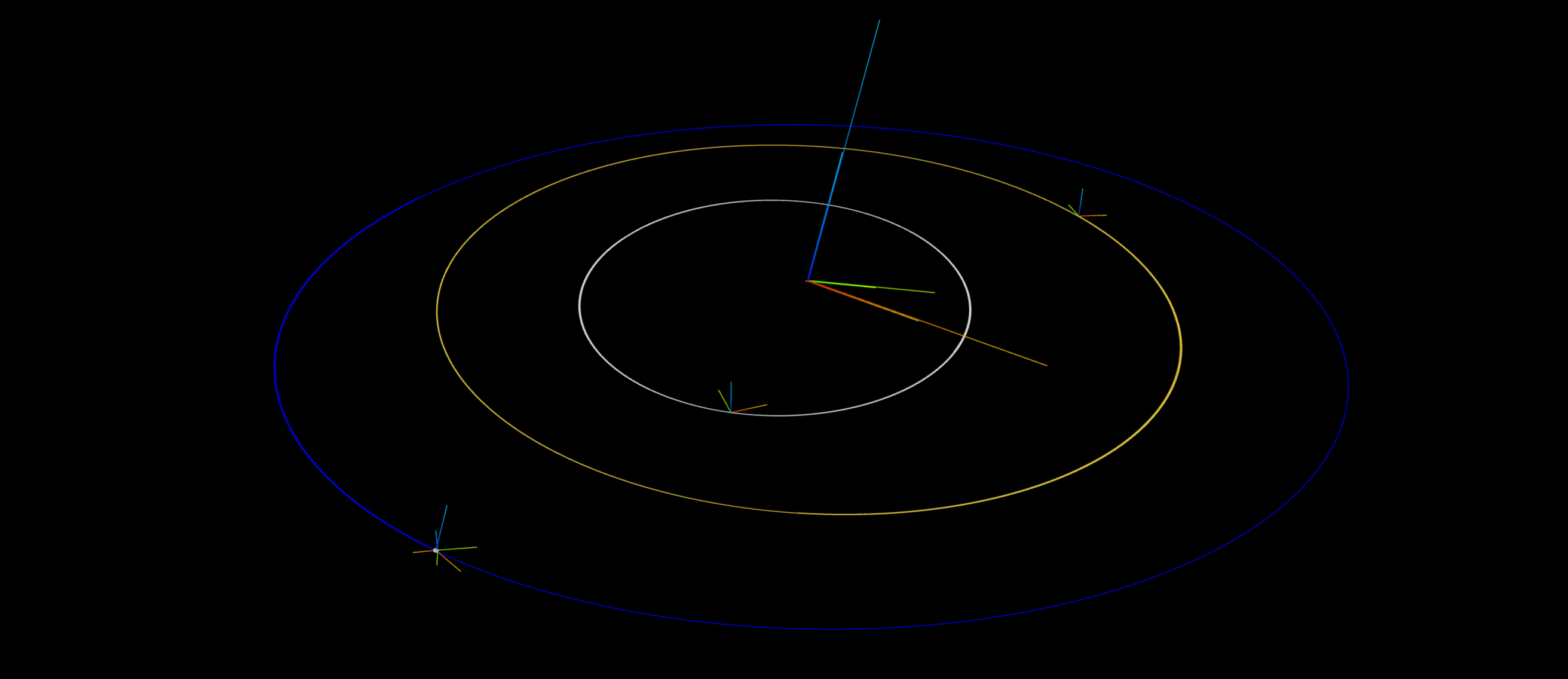
Below we add ProxySceneNodes for each planetary body we are interested in tracking.
earth_node = ProxySceneNode("earth_scene_node", proxy_scene)
earth_node.attachTo(earth)
earth_node.graphics().showAxes(1e10)
earth_node.graphics().trail(color=Color.BLUE)

ssbc_node = ProxySceneNode("ssbc_scene_node", proxy_scene)
ssbc_node.attachTo(ssbc_j2000)
ssbc_node.graphics().showAxes(8e10)
ssbc_node.graphics().trail()
del ssbc_node

sun_node = ProxySceneNode("sun_scene_node", proxy_scene)
sun_node.attachTo(sun_j2000)
sun_node.graphics().showAxes(4e10)
sun_node.graphics().trail()
del sun_node

mercury_node = ProxySceneNode("mercury_scene_node", proxy_scene)
mercury_node.attachTo(mercury)
mercury_node.graphics().showAxes(1e10)
mercury_node.graphics().trail(color=Color.DARKGRAY)
del mercury_node

venus_node = ProxySceneNode("venus_scene_node", proxy_scene)
venus_node.attachTo(venus)
venus_node.graphics().showAxes(1e10)
venus_node.graphics().trail(color=Color.DARKGOLDENROD)
del venus_node

moon_node = ProxySceneNode("moon_scene_node", proxy_scene)
moon_node.attachTo(moon)
moon_node.graphics().showAxes(5e9)
moon_node.graphics().trail(earth_node.graphics(), color=Color.GREY)
del moon_node
del earth_node

proxy_scene.update()
Run and Clean Up the Simulation#
Below we “run” our simulation by querying the Spice Frame’s positions in the Frame Container for a series of times defined by our timestep. We start at our defined epoch, step forwards by an hour, update the scene, and then sleep for 0.01 seconds. We do this to simulate orbits for two years.
deltaT = 3600 * 1  # 1 hour


def run(nsteps):
    """Run the simulation for the given number of steps.

    Parameters
    ----------
    nsteps : int
        The number of steps to run the simulation for.
    """
    for i in range(nsteps):
        global deltaT

        # Query the frame container for current ephemeris time,
        # advance by our timestep, and render the proxy scene.
        # Updating the ephemeris is done here manually. However, this is
        # taken care of automatically for simulations that have a StatePropagator
        # instance once the initial ephemeris is set on the StatePropagator's
        # TimeKeeper.
        et = fc.getEphemerisTime()
        fc.setEphemerisTime(et + deltaT)
        proxy_scene.update()

        # Approx 100 hours per second
        sleep(0.01)


# run simulation forwards two years
nsteps = 365 * 24 * 2
run(nsteps)
Below, we cleanup everything whenever the script exists. This requires us to delete local variables and discard our containers and scene.
# Cleanup
def cleanup():
    """Cleanup the simulation."""
    global mercury, earth, venus, moon, sun_j2000, ssbc_j2000, proxy_scene
    del mercury, moon, venus, earth, sun_j2000, ssbc_j2000, proxy_scene

    cleanup_graphics()

    discard(mb)
    discard(fc)


atexit.register(cleanup)
<function __main__.cleanup()>