ATRVjr Reinforcement Learning#
This tutorial extends Cart Pole Reinforcement Learning by training a model to drive an ATRVjr vehicle to a target. This tutorial consists of 2 parts: building the environment and training a model on the environment.
Requirements:
In this tutorial we will:
Implement gymnasium.Env
Create the multibody
Create Environment
Setup the simulation
Environment attributes
Setup helpers
Reset the environment
Step the environment
Train the model
Load the environment
Setup callbacks
Train a SAC model
Test model performance
Scripts:
For a more in-depth descriptions of kdflex concepts see usage.
First let’s verify that the reinforcement learning packages are installed:
try:
    import stable_baselines3
    import gymnasium
except ModuleNotFoundError:
    raise ModuleNotFoundError(
        "Please ensure that the following python packages are installed:\n"
        "    stable_baseline3 gymnasium"
    )
Implement gymnasium.Env#
Because classes can’t be split across notebook cells, we will show snippets of code with explanations. The full class is found at env.py.
from typing import Optional, cast
import numpy as np
import gymnasium as gym
from pathlib import Path
from math import pi, sqrt

from Karana.Frame import FrameContainer
from Karana.Core import discard, allDestroyed
from Karana.Dynamics.SOADyn_types import (
    MultibodyDS,
    PinSubhingeDS,
    Linear3SubhingeDS,
    SphericalSubhingeDS,
    HingeDS,
    BodyWithContextDS,
    ScenePartSpecDS,
)
from Karana.Dynamics import (
    Multibody,
    HingeType,
    StatePropagator,
    TimedEvent,
    PhysicalBody,
    PhysicalHinge,
)
from Karana.Math import UnitQuaternion, HomTran
from Karana.Scene import (
    BoxGeometry,
    CylinderGeometry,
    Color,
    PhysicalMaterialInfo,
    PhysicalMaterial,
    LAYER_GRAPHICS,
    LAYER_ALL,
    LAYER_COLLISION,
    Texture,
)
from Karana.Scene import ProxyScenePart, ProxyScene
from Karana.Scene import CoalScene
from Karana.Collision import FrameCollider
from Karana.Models import Gravity, UniformGravity, UpdateProxyScene, SyncRealTime, PenaltyContact, OutputUpdateType
from Karana.Math import IntegratorType


# helper to wrap angles
def wrap_to_pi(x):
    return (x + np.pi) % (2 * np.pi) - np.pi
Create the Multibody#
We create and edit our multibody by importing a URDF file into a SOADyn_types.MultibodyDS. This is the same procedure as ATRVjr driving.
def createMbody(fc: FrameContainer) -> Multibody:
    urdf_file = Path().absolute().parent / "resources" / "atrvjr" / "atrvjr.urdf"
    multibody_info = MultibodyDS.fromUrdf(urdf_file)
    # convert to full6DOF hinge between root frame and rover.
    multibody_info.base_bodies[0].body.hinge = HingeDS(
        hinge_type=HingeType.FULL6DOF,
        subhinges=[
            Linear3SubhingeDS(prescribed=False),
            SphericalSubhingeDS(prescribed=False),
        ],
    )

    # unlock locked Hinges for wheels from the URDF
    for i in [0, 1]:
        multibody_info.base_bodies[0].children[i].body.hinge = HingeDS(
            hinge_type=HingeType.REVOLUTE,
            subhinges=[PinSubhingeDS(prescribed=False, unit_axis=np.array([0.0, 0.0, 1.0]))],
        )
    for i in [2, 3]:
        multibody_info.base_bodies[0].children[i].body.hinge = HingeDS(
            hinge_type=HingeType.REVOLUTE,
            subhinges=[PinSubhingeDS(prescribed=False, unit_axis=np.array([0.0, 0.0, -1.0]))],
        )

    # Remove all collision meshes. We want to add these manually.
    def removeCollision():
        def _removeParts(parts: list[ScenePartSpecDS]):
            idx = []
            for k,p in enumerate(parts):
                if p.layers == LAYER_COLLISION:
                    idx.append(k)
            idx.reverse()
            for k in idx:
                parts.pop(k)

        def _recurse(b: BodyWithContextDS):
            _removeParts(b.body.scene_parts)
            for c in b.children:
                _recurse(c)

        for base in multibody_info.base_bodies:
            _recurse(base)

    removeCollision()

    multibody = multibody_info.toMultibody(fc)
    multibody.ensureHealthy()
    multibody.resetData()
    assert multibody.isReady()
    return multibody
Create Environment#
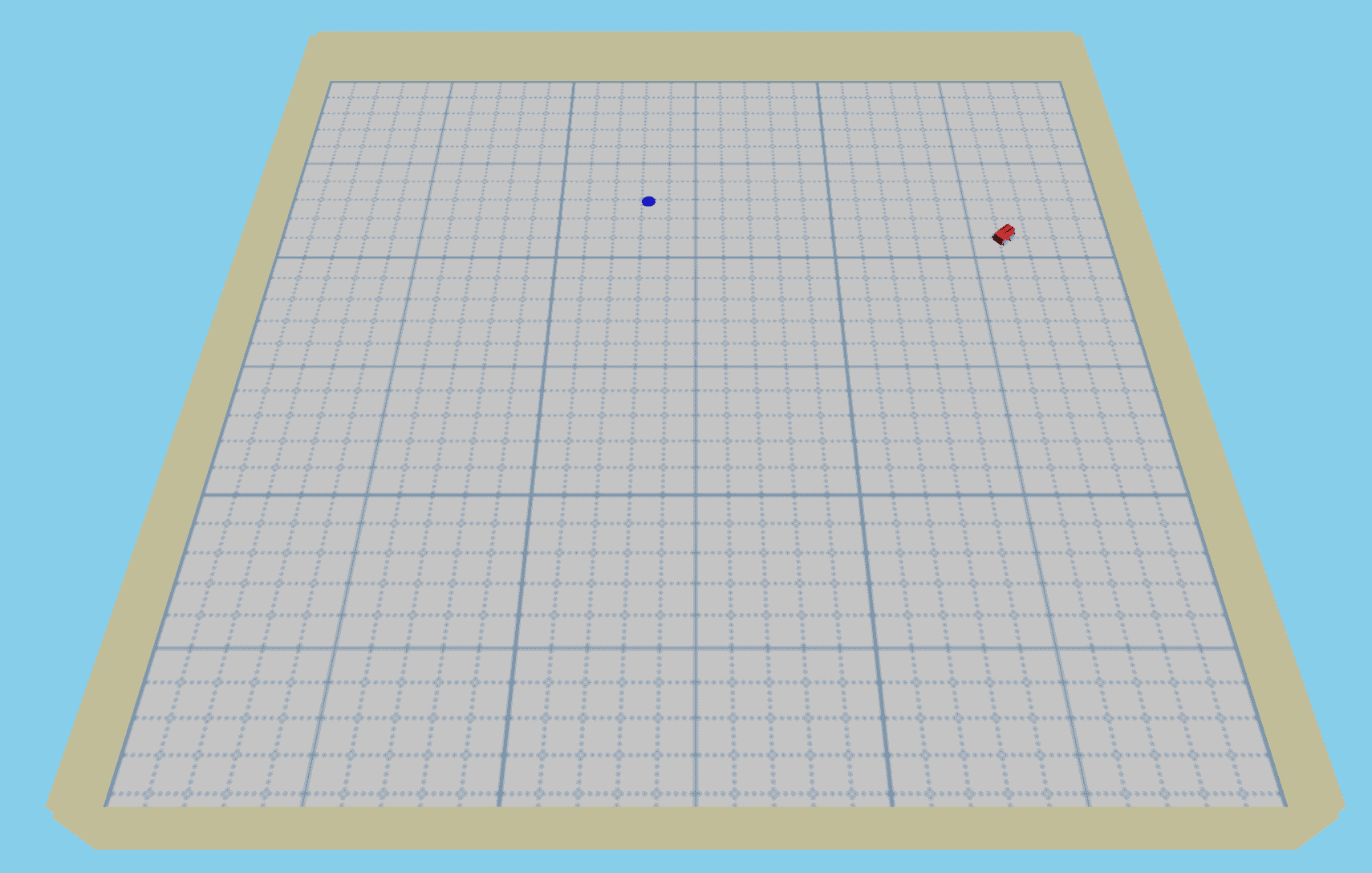
Here, we attach cylinder geometries for the wheels. Additionally, we set up the ground and apply a custom grid texture from a .png file using Karana.Scene.Texture.lookupOrCreateTexture(). We add walls around all four sides to detect when the car is going out of bounds by checking for collisions.
def createEnvironment(
    size: int, mb: Multibody, proxy_scene: ProxyScene
) -> tuple[PhysicalBody, PhysicalBody, PhysicalBody, PhysicalBody]:
    thickness = 0.25
    height = 2.5
    mat_info = PhysicalMaterialInfo()
    mat_info.color = Color.GRAY
    gray = PhysicalMaterial(mat_info)
    # add wheels to our atrv model
    wheel_geom = CylinderGeometry(0.125, 0.075)
    left_front_wheel = mb.getBody("left_front_wheel_link")
    left_front_wheel_node = ProxyScenePart(
        name="left_front_wheel_link_node", scene=proxy_scene, geometry=wheel_geom, material=gray
    )
    left_front_wheel_node.attachTo(left_front_wheel)
    left_front_wheel_node.setTranslation([0, 0, 0.03])
    left_front_wheel_node.setUnitQuaternion(UnitQuaternion(pi / 2, [1.0, 0.0, 0.0]))

    left_rear_wheel = mb.getBody("left_rear_wheel_link")
    left_rear_wheel_node = ProxyScenePart(
        name="left_rear_wheel_link_node", scene=proxy_scene, geometry=wheel_geom, material=gray
    )
    left_rear_wheel_node.attachTo(left_rear_wheel)
    left_rear_wheel_node.setTranslation([0, 0, 0.03])
    left_rear_wheel_node.setUnitQuaternion(UnitQuaternion(pi / 2, [1.0, 0.0, 0.0]))

    right_front_wheel = mb.getBody("right_front_wheel_link")
    right_front_wheel_node = ProxyScenePart(
        name="right_front_wheel_link_node", scene=proxy_scene, geometry=wheel_geom, material=gray
    )
    right_front_wheel_node.attachTo(right_front_wheel)
    right_front_wheel_node.setTranslation([0, 0, 0.03])
    right_front_wheel_node.setUnitQuaternion(UnitQuaternion(pi / 2, [1.0, 0.0, 0.0]))

    right_rear_wheel = mb.getBody("right_rear_wheel_link")
    right_rear_wheel_node = ProxyScenePart(
        name="right_rear_wheel_link_node", scene=proxy_scene, geometry=wheel_geom, material=gray
    )
    right_rear_wheel_node.attachTo(right_rear_wheel)
    right_rear_wheel_node.setTranslation([0, 0, 0.03])
    right_rear_wheel_node.setUnitQuaternion(UnitQuaternion(pi / 2, [1.0, 0.0, 0.0]))

    # add ground
    ground_geom = BoxGeometry(size, size, thickness)
    mat_info.color = Color.WHITE
    texture_file = Path().absolute().parent / "resources" / "atrvjr" / "grid.png"
    grid_texture = Texture.lookupOrCreateTexture(str(texture_file))
    mat_info.color_map = grid_texture
    grid = PhysicalMaterial(mat_info)
    ground = ProxyScenePart(
        "ground", scene=proxy_scene, geometry=ground_geom, material=grid, layers=LAYER_ALL
    )
    ground.setTranslation([0, 0, -0.1])

    # add walls
    mat_info.color = Color.KHAKI
    mat_info.color_map = None
    khaki = PhysicalMaterial(mat_info)
    wall_geom = BoxGeometry(size, thickness, height)
    north_wall = ProxyScenePart(
        "north_wall", scene=proxy_scene, geometry=wall_geom, material=khaki, layers=LAYER_ALL
    )
    north_wall.setTranslation([size / 2.0 + thickness / 2, 0, height / 2 - thickness])
    north_wall.setUnitQuaternion(UnitQuaternion([1 / sqrt(2), 1 / sqrt(2), 0, 0]))
    south_wall = ProxyScenePart(
        "south_wall", scene=proxy_scene, geometry=wall_geom, material=khaki, layers=LAYER_ALL
    )
    south_wall.setTranslation([-size / 2.0 - thickness / 2, 0, height / 2 - thickness])
    south_wall.setUnitQuaternion(UnitQuaternion([-1 / sqrt(2), 1 / sqrt(2), 0, 0]))
    west_wall = ProxyScenePart(
        "west_wall", scene=proxy_scene, geometry=wall_geom, material=khaki, layers=LAYER_ALL
    )
    west_wall.setTranslation([0, size / 2.0 + thickness / 2, height / 2 - thickness])
    east_wall = ProxyScenePart(
        "east_wall", scene=proxy_scene, geometry=wall_geom, material=khaki, layers=LAYER_ALL
    )
    east_wall.setTranslation([0, -size / 2.0 - thickness / 2, height / 2 - thickness])

    return left_front_wheel, left_rear_wheel, right_front_wheel, right_rear_wheel
Initialize Attributes#
Similar to Cart Pole, it is necessary to implement a few key attributes. Here is the breakdown for this scenario:
observation space: The agent is able to see the target position, car position, car linear velocities, car roll, car yaw velocity, sine of the angle deviation from target, and the cosine of the angle deviation.
roll is passed so the agent can see if it turns too sharply and flips over
it is common to use sin and cosine for angles to preserve continuity in values, as a jump between -3.14 and 3.14 radians (which are the same) can mess up training
minimum and maximum velocities were found through direct testing
action space: The agent is able to select 2 continuous values between -1 and 1 that is scaled by self._torque_magnitude to be applied to the left-side and right-side wheels.
np_random is a random number generator which can be seeded for reproducibility.
render_mode determines whether or not to show graphics visualizations. “none” is faster, but shows no graphics while human renders the webscene.
class ATRVEnv(gym.Env):
    metadata = {"render_modes": ["human", "none"]}

    def __init__(
        self,
        render_mode: Optional[str] = None,
        port: int = 0,
        sync_real_time: bool = False,
        **kwargs,
    ):
        self.render_mode = "none"
        if render_mode and render_mode in self.metadata["render_modes"]:
            self.render_mode = render_mode
        self.size = 30
        self._bound = self.size / 2.0 - 3.0
        self._torque_magnitude = 20.0

        # initialize the simulation
        self.init_sim(port, sync_real_time)

        # [txpos, typos, x, y, vx, vy, roll, yaw_vel, sin(angle_diff), cos(angle_diff)]
        low = np.array(
            [
                -self._bound,
                -self._bound,
                -self.size,
                -self.size,
                -6.0,
                -6.0,
                -0.25,
                -6.0,
                -1.0,
                -1.0,
            ],
            dtype=np.float32,
        )
        high = np.array(
            [self._bound, self._bound, self.size, self.size, 6.0, 6.0, 0.25, 6.0, 1.0, 1.0],
            dtype=np.float32,
        )
        self.observation_space = gym.spaces.Box(low=low, high=high, dtype=np.float32)

        # define action space
        # torque on [left, right]
        self.action_space = gym.spaces.Box(low=-1.0, high=1.0, shape=(2,), dtype=np.float32)

        # initialize class variables
        self._target = None
        self._left = None
        self._right = None
        self._target_pos = None
        self._agent_pos = None
        self._agent_vel = None
        self._agent_roll = None
        self._agent_yaw_vel = None
        self._angle_diff = None
        self.np_random = None
Setup the Simulation#
Here the environment follows the same simulation procedures all other notebooks. This time, the Karana.Frame.ChainedFrameToFrame as well as the 6 degree of freedom hinge between the origin and multibody is saved.
Karana.Frame.ChainedFrameToFrame(self._f2f) allows for querying of the relative pose, spatial velocity, and spatial acceleration. Since this is between the world origin and the ATRVjr multibody, then this will query for the world coordinates of the multibody.Karana.Dynamics.PhysicalHinge(self._root_hinge) consists of a full 3D positional and 3D angular hinge between the world origin and the ATRVjr multibody. By setting the linear and angular subhinge values, the pose, velocity, and acceleration of the multibody can be set.
The StatePropagator callback functions implement applying torques and checking for termination.
check_termination(t, x)will terminate the episode if the car has flipped over or collided with the walls.pre_deriv_fn(t, x)applies torques to move the wheels.
def init_sim(self, port: int = 0, sync_real_time: bool = False):
        # setup bodies and scene
        self._fc = FrameContainer("root")
        self._mb = createMbody(self._fc)

        # attach our multibody's to the root frame
        self._f2f = cast(PhysicalBody, self._mb.virtualRoot()).frameToFrame(
            self._mb.getBody("center_link")
        )
        self._root_hinge = cast(PhysicalHinge, self._mb.getBody("center_link").parentHinge())

        # setup graphics if enabled
        if self.render_mode == "human":
            self._cleanup_graphics, viz_scene = self._mb.setupGraphics(axes=0.5, port=port)
            viz_scene.defaultCamera().pointCameraAt(
                [-0.8 * self.size, 0.0, self.size], [0, 0, 0], [0, 0, 1]
            )
            self._proxy_scene = self._mb.getScene()
        else:
            self._proxy_scene = ProxyScene(f"{self._mb.name()}_proxyscene", self._mb.virtualRoot())

        # setup wheels, ground, and walls
        left_front_wheel, left_rear_wheel, right_front_wheel, right_rear_wheel = createEnvironment(
            self.size, self._mb, self._proxy_scene
        )

        # setup collision client
        col_scene = CoalScene("collision_scene")
        self._proxy_scene.registerClientScene(
            col_scene, self._mb.virtualRoot(), layers=LAYER_COLLISION
        )

        # setup state propagator and models
        self._sp = StatePropagator(self._mb, integrator_type=IntegratorType.RK4)

        # gravity model
        ug = Gravity("grav_model", sp, UniformGravity("uniform_gravity"), mb)
        ug.getGravityInterface().setGravity(np.array([0, 0, -9.81]), 0.0, OutputUpdateType.PRE_HOP)
        del ug

        # for visualization
        if sync_real_time:
            SyncRealTime("sync_real_time",self._sp, 1.0)

        # update proxy scene model
        UpdateProxyScene("update_proxy_scene",self._sp, self._proxy_scene)

        # collision model
        hc = HuntCrossley("hunt_crossley_contact")
        hc.params.kp = 100000
        hc.params.kc = 20000
        hc.params.mu = 0.3
        hc.params.n = 1.5
        hc.params.linear_region_tol = 1e-3
        PenaltyContact("penalty_contact", self._sp, self._mb, [FrameCollider(self._proxy_scene, col_scene)], hc)
        del hc

        def check_termination(t, x):
            # check if the car is flipping over
            flip = abs(self._f2f.relTransform().getUnitQuaternion().toEulerAngles().alpha()) > 0.2
            # if more than our 4 wheels are in contact, we have a collision
            if len(col_scene.cachedCollisions()) > 4 or flip:
                self._terminated = True
                return True
            return False

        def pre_deriv_fn(t, x):
            left_front_wheel.parentHinge().subhinge(0).setT(self._left)
            left_rear_wheel.parentHinge().subhinge(0).setT(self._left)
            right_front_wheel.parentHinge().subhinge(0).setT(self._right)
            right_rear_wheel.parentHinge().subhinge(0).setT(self._right)

        self._sp.fns.pre_deriv_fns["apply_torque"] = pre_deriv_fn
        self._sp.fns.terminate_advance_to_fns["check_termination"] = check_termination
Setup Helpers#
These are a few helper functions for gymnasium. _get_obs composes the observation values into a numpy array for a model to train on, and _get_info is primarily for user debugging.
def _get_obs(self):
        return np.concatenate(
            (
                self._target_pos,
                self._agent_pos,
                self._agent_vel,
                self._agent_roll,
                self._agent_yaw_vel,
                np.sin(self._angle_diff),
                np.cos(self._angle_diff),
            )
        ).astype(np.float32)

    # use non-normalized values for info
    def _get_info(self):
        return {
            "target_pos": self._target_pos,
            "agent_pos": self._agent_pos,
            "agent_vel": self._agent_vel,
            "agent_roll": self._agent_roll,
            "agent_yaw_vel": self._agent_yaw_vel,
            "angle_diff": self._angle_diff,
        }

    def close(self):
        del self._proxy_scene, self._f2f, self._root_hinge, self._target
        discard(self._sp)
        if self.render_mode == "human":
            self._cleanup_graphics()
        discard(self._mb)
        discard(self._fc)
        assert allDestroyed()
Reset the Environment#
As explained in Cart Pole, this method refreshes the environment to a new scenario at the start of every episode. Here, the stored attributes are reset, and the multibody is set to an arbitrary position and yaw orientation using its root hinge. At the same time, the blue target is set to a random position on the board as well.
def reset(self, seed: Optional[int] = None, options: Optional[dict] = None):
        super().reset(seed=seed)
        if self.np_random is None:
            self.np_random, _ = gym.utils.seeding.np_random(seed)

        # initialize values
        self._terminated = False
        self._left = 0.0
        self._right = 0.0
        self._target_pos = self.np_random.uniform(-self._bound, self._bound, size=(2,)).astype(
            np.float32
        )
        self._agent_pos = self.np_random.uniform(-self._bound, self._bound, size=(2,)).astype(
            np.float32
        )
        self._agent_vel = np.zeros(2, dtype=np.float32)
        self._agent_roll = np.zeros(1, dtype=np.float32)
        self._agent_yaw_vel = np.zeros(1, dtype=np.float32)
        agent_yaw = self.np_random.uniform(-np.pi, np.pi, size=(1,)).astype(np.float32)

        # calculate previous distance and angle difference
        difference = self._target_pos - self._agent_pos
        ideal_angle = np.arctan2(difference[1], difference[0])
        self._distance = np.linalg.norm(difference)
        self._angle_diff = wrap_to_pi(ideal_angle - agent_yaw)

        # reset the rover position and velocity
        self._mb.resetData()
        orientation = UnitQuaternion(agent_yaw[0], [0.0, 0.0, 1.0])
        self._root_hinge.fitQ(
            HomTran(q=orientation, vec=[self._agent_pos[0], self._agent_pos[1], 0])
        )

        # add the target
        if not self._target:
            mat_info = PhysicalMaterialInfo()
            mat_info.color = Color.BLUE
            blue = PhysicalMaterial(mat_info)

            # create the target
            target_geom = CylinderGeometry(0.25, 0.05)
            self._target = ProxyScenePart(
                "target_part",
                scene=self._proxy_scene,
                geometry=target_geom,
                material=blue,
                layers=LAYER_GRAPHICS,
            )
        self._target.setTranslation([self._target_pos[0], self._target_pos[1], 0.25])
        self._target.setUnitQuaternion(UnitQuaternion([1 / sqrt(2), 0, 0, 1 / sqrt(2)]))

        # simulation
        t_init = np.timedelta64(0, "ns")
        self._sp.setTime(t_init)
        self._sp.setState(self._sp.assembleState())

        # setup timed event (every 0.01s)
        h = np.timedelta64(int(1e7), "ns")
        t = TimedEvent("hop_size", h, lambda _: None, False)
        t.period = h
        self._sp.registerTimedEvent(t)
        del t
        self._proxy_scene.update()
        return self._get_obs(), self._get_info()
Step the Environment#
After every model decision, the simulation is advanced and the current multibody pose and velocities are queried using the FrameToFrame. These values will be passed as part of the observation.
This reward function will give 4.0 for reaching the target, and -4.0 for collision. If neither of these terminating conditions are met, then it uses these criteria:
progress how much closer the car has gotten to the target compared to the last timestep
angle_progress how much closer the car’s front is facing to the target compared to the last timestep
step penalty subtract a small amount per step to incentivize the car to reach the target as soon as possible
    def step(self, action: np.ndarray):
        torque = action * self._torque_magnitude
        self._left = torque[0]
        self._right = torque[1]
        self._sp.advanceBy(0.05)
        T = self._f2f.relTransform()
        self._agent_pos = T.getTranslation()[:2]
        q = T.getUnitQuaternion()
        ea = q.toEulerAngles()
        agent_yaw = np.array([ea.gamma()])
        self._agent_roll = np.array([ea.alpha()])
        sp_vel = self._f2f.relSpVel().toVector6()
        self._agent_vel = sp_vel[3:5]
        self._agent_yaw_vel = np.array([sp_vel[2]])

        # check termination
        difference = self._target_pos - self._agent_pos
        distance = np.linalg.norm(difference)
        ideal_angle = np.arctan2(difference[1], difference[0])
        angle_diff = wrap_to_pi(ideal_angle - agent_yaw)
        reward = 0.0
        if bool(distance < 1.0):
            self._terminated = True
            reward += 4.0
        elif self._terminated:
            reward -= 4.0
        else:
            # reward calculations
            progress = self._distance - distance
            angle_progress = np.abs(self._angle_diff) - np.abs(angle_diff)
            reward += progress
            reward += 4 * angle_progress
            reward -= 0.03  # step penalty
            self._distance = distance
            self._angle_diff = angle_diff

        # observation, reward, terminated, truncated, data
        return self._get_obs(), float(reward), self._terminated, False, self._get_info()
Train the model#
Awesome, now that the environment is setup training can begin. This tutorial also uses Stable Baselines3, so make sure these dependencies are installed:
pip install stable-baselines3
pip install gymnasium
import os
from env import ATRVEnv
import gymnasium as gym
from stable_baselines3 import SAC
from stable_baselines3.common.vec_env import DummyVecEnv, VecNormalize

gym.register(
    id="kdFlex-ATRVjr",
    entry_point=ATRVEnv,
    max_episode_steps=200,
)
Load the Environment#
Here, we load our training environment by registering it with gymnasium and wrapping it with DummyVecEnv to be compatible with Stable Baselines3. Here, we demonstrate using a function to create multiple environments in a single vectorized environment. While DummyVecEnv will only batch them in a single process, it is also possible to parallelize across different processes using SubProcVecEnv.
There are also 2 other wrappers we use.
Monitor tracks key data for training
VecNormalize automatically normalizes the observations and reward since training models can be unstable with large or varied values.
train_env = env = gym.make("kdFlex-ATRVjr")
train_env = DummyVecEnv([lambda: train_env])
train_env = VecNormalize(train_env)
Setup Callbacks#
A common technique is to use a separate evaluation environment to run periodically during training and stop training if the model hasn’t improved for a specified period of time to prevent overfitting. This section accomplishes this by adding an EvalCallback.
EvalCallback also saves the best model into ./models/best_model.zip
Train a SAC Model#
Because the action space is continuous, a Soft Actor Critic (SAC) model is used with the default hyperparameters.
model = SAC(
    "MlpPolicy",
    train_env,
)
# check if this is running in a test environment
if os.getenv("DTEST_RUNNING", True):
    # in a testing environment, run for less
    model.learn(total_timesteps=1000)
else:
    # takes around 30 minutes
    model.learn(total_timesteps=500000)
Test the Model#
Because the model was trained on normalized observation values, it is important that the test environment also uses normalized values. Therefore, the normalization configuration is first saved into ./models/vec_normalize.pkl before it is loaded into the test environment.
# save the normalization statistics
train_env.save("./models/vec_normalize.pkl")
train_env.close()
test_env = gym.make("kdFlex-ATRVjr", render_mode="human", sync_real_time=True)
test_env = DummyVecEnv([lambda: test_env])
test_env = VecNormalize.load("./models/vec_normalize.pkl", test_env)
test_env.training = False
test_env.norm_reward = False
terminated = False
obs = test_env.reset()
while not terminated:
    action, _states = model.predict(obs, deterministic=True)
    obs, reward, terminated, info = test_env.step(action)
A working model is also saved inside ./models/demo_models if you have difficulty training the model.
test_env.close()
test_env = gym.make("kdFlex-ATRVjr", render_mode="human", sync_real_time=True)
test_env = DummyVecEnv([lambda: test_env])
test_env = VecNormalize.load("./models/demo_vec_normalize.pkl", test_env)
test_env.training = False
test_env.norm_reward = False
model = SAC.load("./models/demo_model", env=test_env)
# cleanup
test_env.close()
# hard process exit
import os

os._exit(0)
Summary#
By following the Gymnasium’s environment standards, you have implemented and solved a more complicated driving scenario. Now you are able to utilize kdFlex’s low-cost computational complexity to tackle increasingly harder problems. Good luck!